Zartek ZA-DIS ZartekPTT Cloud Dispatcher Login – Once-Off
R995.00 Incl. VAT
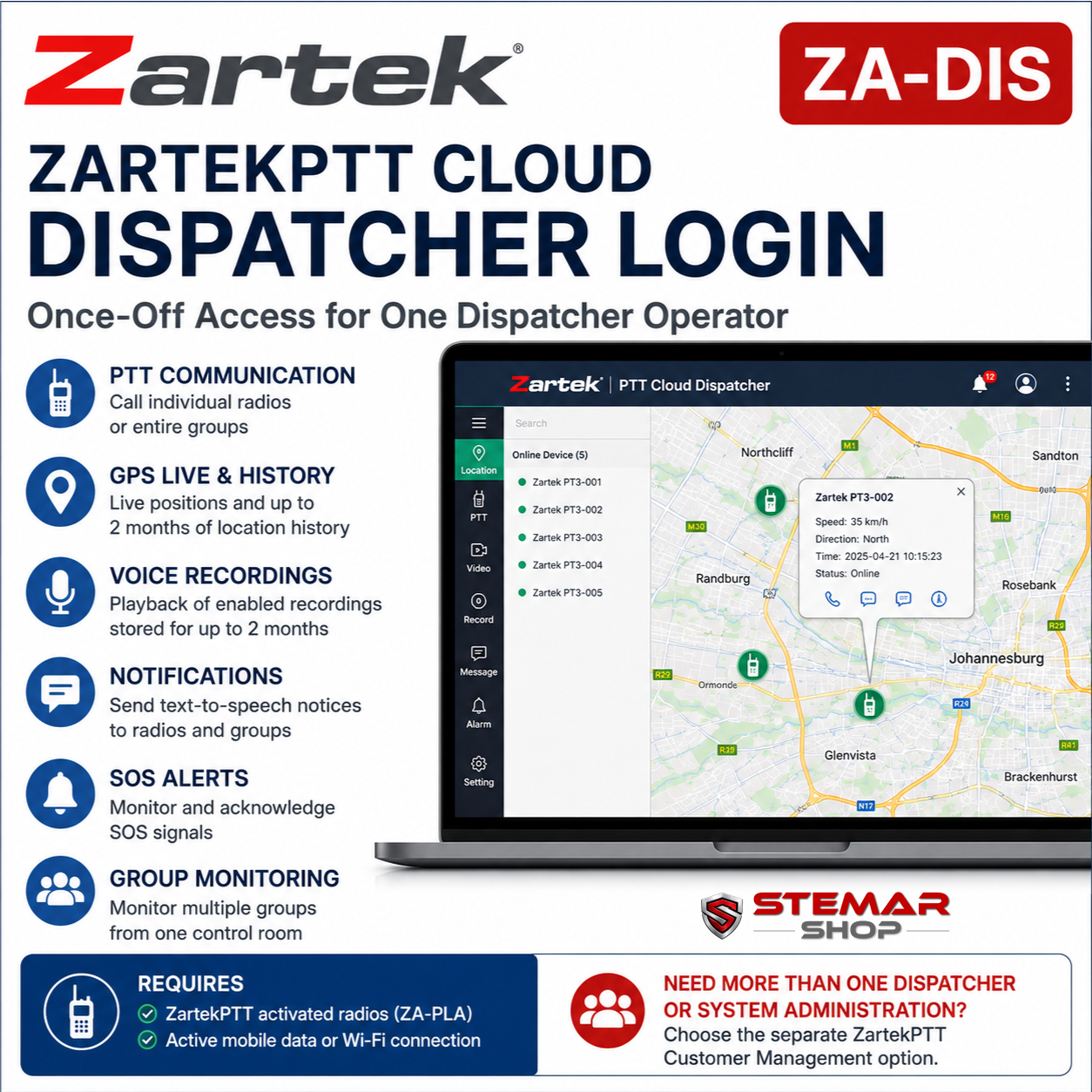
The Zartek ZA-DIS provides one cloud dispatcher login for a control room or supervisor managing radios on the ZartekPTT platform.
- Browser-based access from a PC or laptop
- PTT communication with individual radios and groups
- Live GPS positions and up to two months of location history
- Group monitoring, enabled voice recordings, text-to-speech notices and SOS alerts
- One ZA-DIS purchase covers one dispatcher login; Customer Management is the better option when multiple dispatchers or system administration are required
- Activated ZartekPTT radios and working mobile-data or Wi-Fi connections are required and sold separately
Description
Zartek ZA-DIS – One ZartekPTT Cloud Dispatcher Login for Central Team Control
The Zartek ZA-DIS adds one cloud dispatcher login to a ZartekPTT radio system. It is intended for a control-room operator, supervisor or coordinator who needs to communicate with radios, view their GPS positions and monitor supported system activity from a PC or laptop.
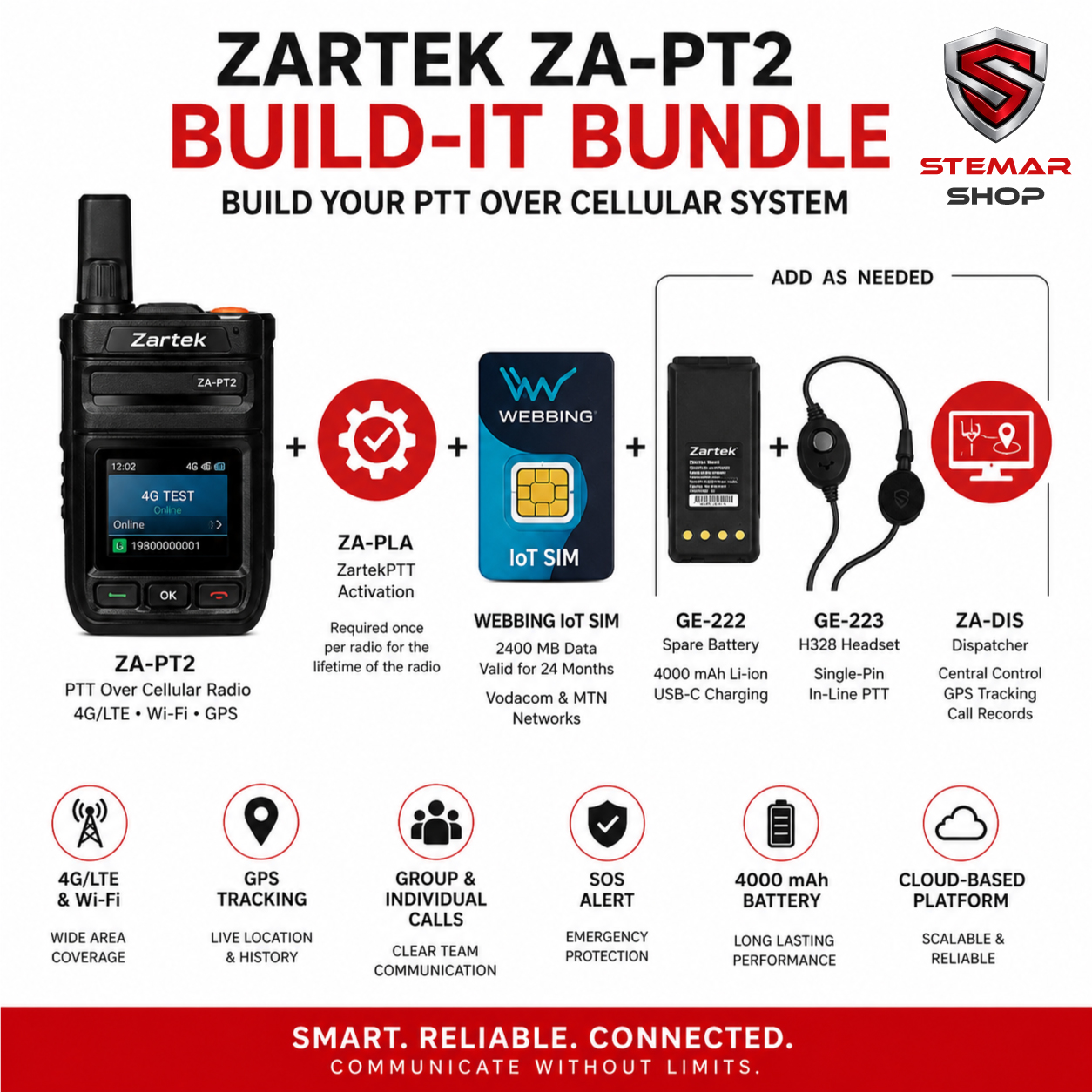
ZA-DIS is separate from the ZA-PLA platform activation. ZA-PLA activates each radio on ZartekPTT, while ZA-DIS gives one dispatcher operator browser-based access to the connected radio system.
Choose the Right Option
- ZA-PLA: Required once-off ZartekPTT activation for each radio. It does not include dispatcher access.
- ZA-DIS: Choose this when one operator needs a ZartekPTT cloud dispatcher login for operational communication, tracking and monitoring.
- Customer Management: Consider the separate once-off Customer Management option when you need two or three dispatcher logins, want to edit radio names and groups, or need to enable functions such as recording, dispatcher access and ALL CALL.
- REALPTT: ZA-DIS is for ZartekPTT systems. REALPTT uses its own separate annual dispatcher service.
Is This Right for You?
ZA-DIS is suited to security control rooms, logistics teams, transport operations, mobile workforces and other organisations that need one central operator to communicate with radios and monitor their positions.
You do not need ZA-DIS for ordinary group or individual communication between activated ZartekPTT radios. Choose it when a supervisor or control room needs the additional dispatcher tools. For more than one dispatcher or direct control over radio names, groups and enabled functions, Customer Management is likely to be the more suitable option.
How It Works
Once a dispatcher username and password have been issued, the operator signs into the ZartekPTT Cloud Dispatcher through a web browser on a PC or laptop. Connected radios communicate with the ZartekPTT platform through mobile data or Wi-Fi.
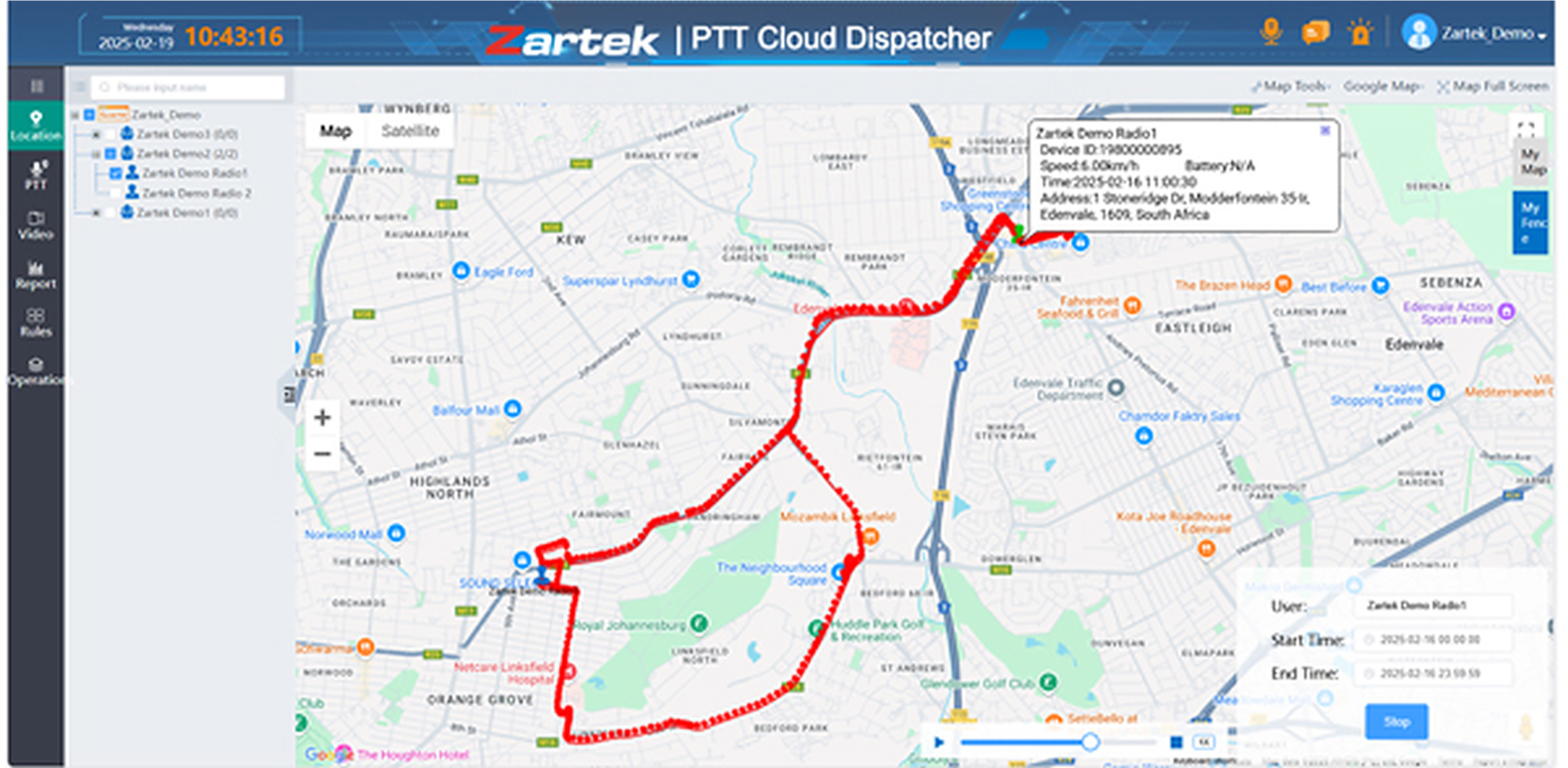
The dispatcher can select an online radio or group, initiate PTT communication, monitor selected groups and view supported radios on the map. Individual radio calls can also be started from the user list or the radio information window on the location map.
GPS must be enabled in both the radio settings and the cloud user settings before its position can be displayed. Recorded GPS history is stored on the cloud for up to two months.
Why Choose This Product?
- Central voice dispatch: Communicate with individual radios or entire groups from the dispatcher interface.
- Multiple-group monitoring: Monitor conversations across selected groups from one control-room login.
- Live GPS information: View the reported position of an online radio on the dispatcher map.
- Historical tracking: Review stored GPS movement history for supported radios, with locations retained for up to two months.
- Voice-record playback: Search and replay enabled user or group recordings, with recordings retained on the server for up to two months.
- Text-to-speech notifications: Send a typed notice to an individual radio or group for the radio to announce as speech.
- SOS monitoring: Receive and acknowledge SOS alerts sent by radios while the dispatcher is online.
- Browser-based access: Use the cloud dispatcher from a suitable PC or laptop without purchasing a physical dispatcher console.
Before You Buy
- One ZA-DIS purchase provides one dispatcher login.
- ZA-DIS does not include or replace the ZA-PLA activation required for each radio using ZartekPTT.
- Radio hardware, SIM cards, mobile data and platform activation are sold separately.
- Each connected radio requires working mobile-data or Wi-Fi internet access.
- GPS must be enabled on the radio and in the cloud user settings before its position can be viewed.
- Recording for a specific radio or group must first be enabled through Customer Management before recordings can be accessed by the dispatcher.
- ALL CALL and certain other functions must first be enabled through Customer Management.
- An SOS alert can only be received and monitored while a dispatcher is online.
- For up to three dispatcher logins and direct administration of names, groups and enabled functions, select the separate Customer Management option instead.
- ZA-DIS applies to ZartekPTT and is not the annual REALPTT dispatcher service.
Technical Specifications
| Model | ZA-DIS |
|---|---|
| Product Type | ZartekPTT cloud dispatcher login |
| Fee Basis | Once-off |
| Login Coverage | 1 dispatcher login |
| Platform | ZartekPTT |
| Access Method | Web browser on a PC or laptop |
| Individual Communication | PTT communication with selected online radios |
| Group Communication | PTT communication with selected radio groups |
| Group Monitoring | Monitor selected groups through the dispatcher interface |
| Live GPS Location | Supported when GPS is enabled on the radio and in cloud user settings |
| GPS History | Historical location playback for supported radios |
| GPS History Retention | Up to 2 months |
| Voice Recordings | Playback of recordings enabled through Customer Management |
| Recording Retention | Up to 2 months |
| Notifications | Text-to-speech notices to an individual radio or group |
| SOS Monitoring | Receive and monitor radio SOS alerts while the dispatcher is online |
| ALL CALL | Available when the function has been enabled through Customer Management |
| Radio Platform Activation | ZA-PLA required separately for each ZartekPTT radio |
| Radio Connectivity | Active mobile-data or Wi-Fi internet connection required |
| Customer Management | Separate service; not included |
| Physical Hardware | Not included |
Required Products and Services
- Zartek ZA-PLA Platform Activation: Required once per radio being connected to ZartekPTT.
- Zartek ZA-PT2: Compatible ZartekPTT PoC radio for mobile-data or Wi-Fi communication.
- Zartek ZA-PT3 and ZA-PT3-NFC: Compatible when configured to use the ZartekPTT platform.
- Customer Management: Separate administrative option for changing radio names and groups, enabling additional functions and managing up to three dispatcher logins.
Open the Compatibility tab to view the complete verified ZartekPTT radio and service set.
What’s in the Box
- 1 × Zartek ZA-DIS ZartekPTT Cloud Dispatcher Login – Once-Off
ZA-DIS is a virtual service. No radio, physical dispatcher console, software disc or data service is supplied.
Downloads & Documentation
Compatible Devices
| Zartek ZA-PT2 | Compatible with ZA-DIS through the ZartekPTT platform. Each radio requires its own ZA-PLA activation. |
|---|---|
| Zartek ZA-PT3 | Compatible when the radio is configured to use ZartekPTT. ZA-DIS does not apply when the radio is configured for REALPTT or another platform. |
| Zartek ZA-PT3-NFC | Compatible when the radio is configured to use ZartekPTT. ZA-DIS does not apply when the radio is configured for REALPTT or another platform. |
Services and Subscriptions
| Zartek ZA-PLA | Required once-off ZartekPTT activation for each radio connected to the system. |
|---|---|
| Zartek ZA-DIS | You are viewing. Provides one once-off ZartekPTT cloud dispatcher login for PTT communication, GPS tracking, monitoring, recordings, notifications and SOS alerts. |
Need more than one dispatcher? ZartekPTT Customer Management is the better option when you need up to three dispatcher logins together with control over radio names, groups and enabled functions. This product will be added separately once its exact SKU and pricing are confirmed.
Related products
- Quick view

-
Sale!
- Electronics, Mobile Phones, Rugged Phones
Ulefone Armor X13 NFC Rugged Smartphone
- Original price was: R3,790.00.R3,375.00Current price is: R3,375.00. Incl. VAT
- Select options This product has multiple variants. The options may be chosen on the product page
-
Sale!
- Quick view
-
Sale!
- Electronics, LED Panels, Monitors & Displays
Mecer 65″ UHD LED Monitor with Built-in Media Player
- Original price was: R13,186.00.R10,988.00Current price is: R10,988.00. Incl. VAT
- Add to basket
-
Sale!
- Quick view
-
Sale!
- Electronics, LED Panels, Monitors & Displays
Mecer 32″ HD Ready LED Monitor with Built-in Media Player
- Original price was: R3,404.00.R2,836.00Current price is: R2,836.00. Incl. VAT
- Add to basket
-
Sale!